
Five curves come up again and again in Dirac Live discussions. Here they are on one graph, drawn from the actual curve files, with what each is for.
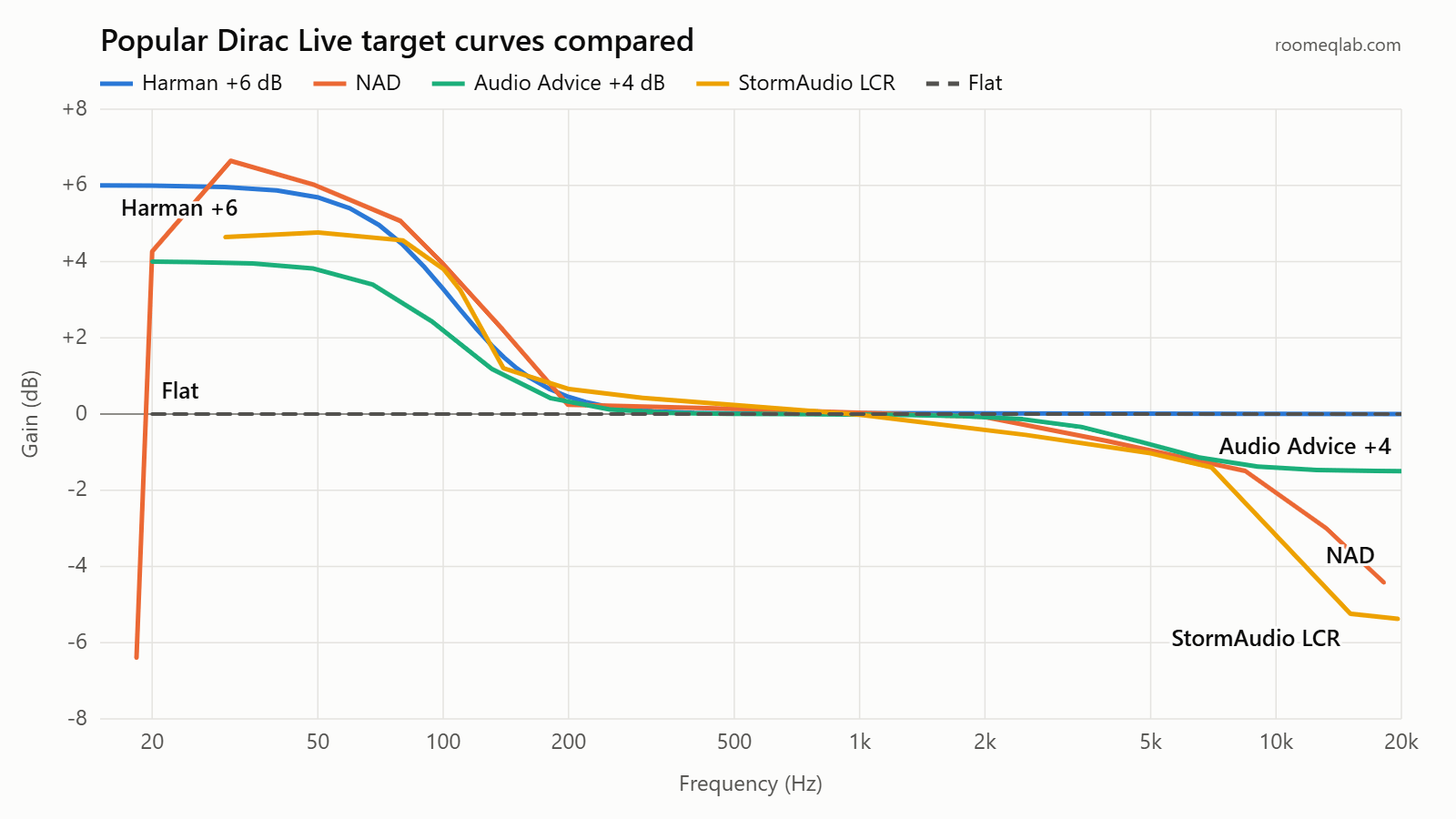
Which curve should you try?
Beginner
| Curve | Bass | Treble | Dirac describes it as | Try it if |
|---|---|---|---|---|
| Harman (+4, +6, +8 dB) | Lifted by 4, 6 or 8 dB below about 40 Hz, back to 0 dB by 400 Hz | Flat | Punchy and dynamic | You want films and modern music with weight and impact |
| NAD | Peaks at about +6.6 dB around 30 Hz, then falls away steeply below 20 Hz | Falls to about -4.4 dB at 18 kHz | Warm and enveloping | You mainly listen to stereo music and want warmth over slam |
| Audio Advice (+3, +4, +5 dB) | Lifted by 3, 4 or 5 dB below about 35 Hz | Falls gently to -1.5 dB | A middle ground for mixed use | Flat sounds dull but Harman feels too heavy |
| StormAudio cinema | About +4.6 dB from 30 to 80 Hz, rolling off below 30 Hz | Falls to about -5.5 dB | A cinema sound without fatigue at high volume | You have a dedicated cinema room and play loud |
| Flat | 0 dB throughout | 0 dB throughout | Analytical and revealing | You want a reference to compare against |
The bass and treble figures above are read from the curve files themselves. The descriptions are Dirac’s.
A simple way to choose
- Films first: start with Harman +6 dB.
- Music first: start with NAD or Audio Advice +4 dB.
- Dedicated cinema room: try the StormAudio set, one curve for each speaker type.
- Export two curves to two slots and switch between them on the same film or album.
Get the files on the downloads page.
Figures come from the curve files, descriptions from Dirac’s target curve guide.
Reading the differences
Advanced
- The Harman and Audio Advice sets differ mainly in how much bass they add. Above a few hundred hertz each set is identical, so switching within a set only changes the bass.
- The Harman files stay flat above 400 Hz. Audio Advice adds a gentle treble roll-off from about 2 kHz. NAD and StormAudio roll off more.
- The NAD file has a steep drop below 20 Hz built in, so it won’t ask the subwoofers for deep infrasonic output.
- The StormAudio set is three curves: left, centre and right; surrounds; and subwoofers (30 to 140 Hz only). The surround curve sits slightly higher through the midrange than the LCR curve.

How we drew the graphs: each line joins the breakpoints stored in the file on a log frequency scale. Dirac Live may draw the curve more smoothly between points. The StormAudio files start at 0 Hz, which a log scale can’t show, so those lines begin at their first point near 30 Hz.